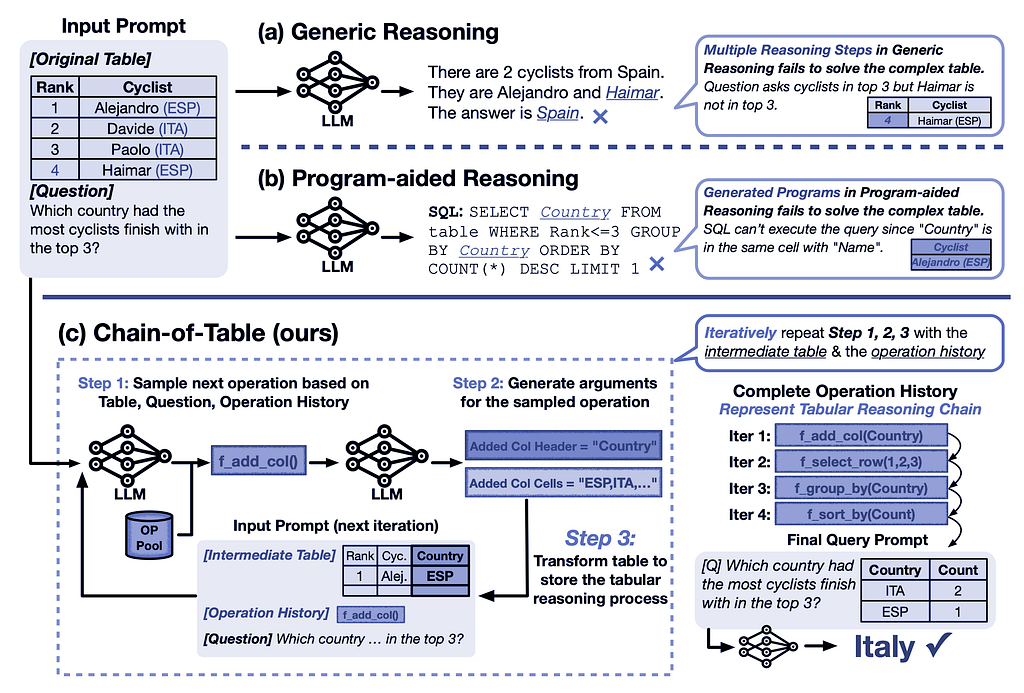
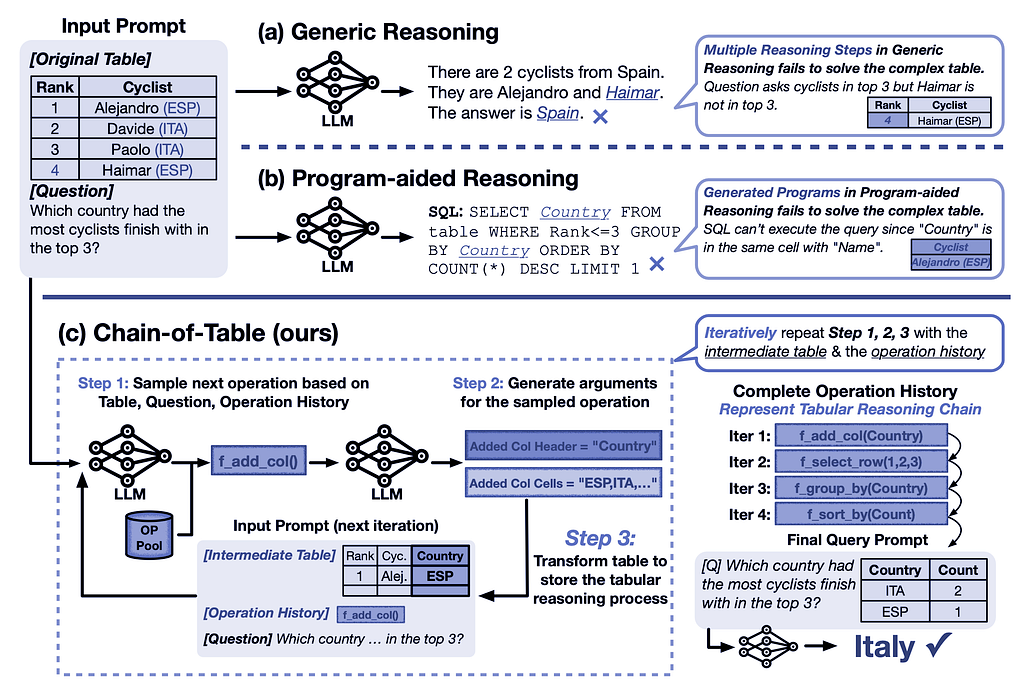
Figure 1: Comparison of generic reasoning, program-aided reasoning, and Chain-of-Table in accurately answering questions based on a complex table.
Paper: arXiv:2401.04398v1 [cs.CL] 9 Jan 2024, ArXiv link: https://arxiv.org/abs/2401.04398
Table of contents:
- I- Introduction
- II- Idea
- III- Constructors
- IV- Results
- V- Python implementation
- VI- Conclusion
I- Introduction
Table-based reasoning with large language models is an emerging field for improving table understanding tasks, such as table-based question answering and fact verification. Unlike generic reasoning, table-based reasoning requires the extraction of underlying semantics from both free-form questions and semi-structured tabular data.
In this context, LLMs can be guided using in-context learning to iteratively generate operations and update the table, thereby creating a tabular reasoning chain. This approach allows LLMs to dynamically plan the next operation based on the results of the previous ones. The continuous evolution of the table forms a chain, which represents the reasoning process for a given tabular problem. This chain carries structured information of the intermediate results, enabling more accurate and reliable predictions.
In recent years, several approaches have been proposed to address the problem of table understanding by training language models. A series of works on prompting techniques, such as Chain-of-Thought and Tree-of-Thought, have further improved the reliability of LLMs by designing reasoning chains. While different works have explored the potential of LLMs in solving table-based problems, these approaches often represent reasoning steps in free-form text, which are not ideally suited for handling complex tables.
II- Idea
The Chain-of-Table methodology conducts step-by-step reasoning through sequential tabular operations, forming a chain of tables. Each table in this chain represents an intermediate result, transformed through specific tabular operations. This procedure mirrors the reasoning process found in the Chain-of-Thought techniques.
A set of table operations is defined, including actions such as adding columns, selecting rows, and grouping, which are commonly used in SQL and DataFrame development. The LLM is prompted to perform step-by-step reasoning. In each step, the LLM dynamically generates the next operation along with its required arguments and then executes the operation on the table programmatically. This operation can either enrich the table by adding detailed intermediate results or condense it by removing irrelevant information. Visualizing these intermediate results is essential for making accurate predictions. The transformed table is then passed back for the next step. This iterative process continues until an ending state is achieved.
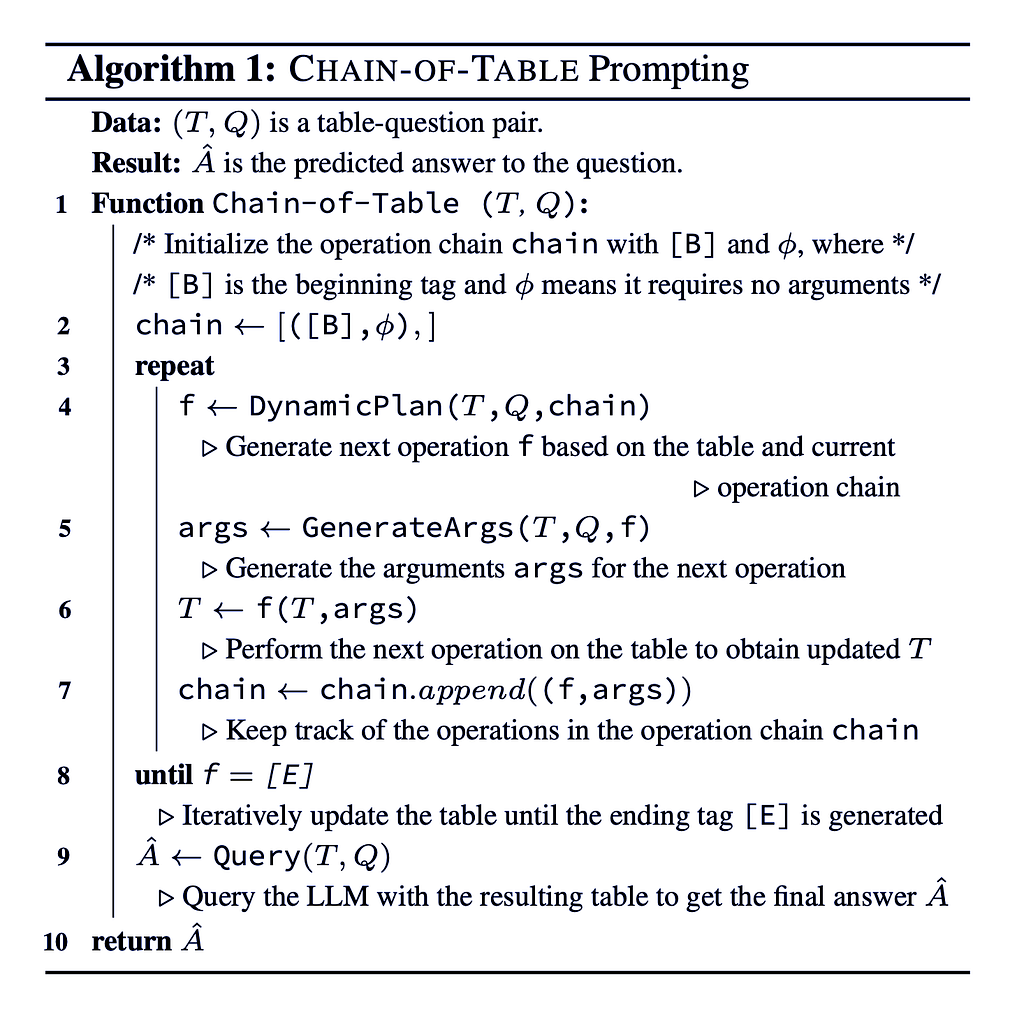
Algorithm 1: The LLM iteratively selects an operation f based on the question Q, the latest table state T, and the operation chain, generates the necessary arguments, executes the operation to transform the table, tracks the operations, and continues until the ending tag [E] is generated, then uses the final table to predict the answer.
By structuring the reasoning process through these tabular operations, the Chain-of-Table enhances the LLM’s capability to handle complex tables, leading to more accurate and reliable predictions.
III- Constructors
Let us see how this Chain-of-Table is constructed:
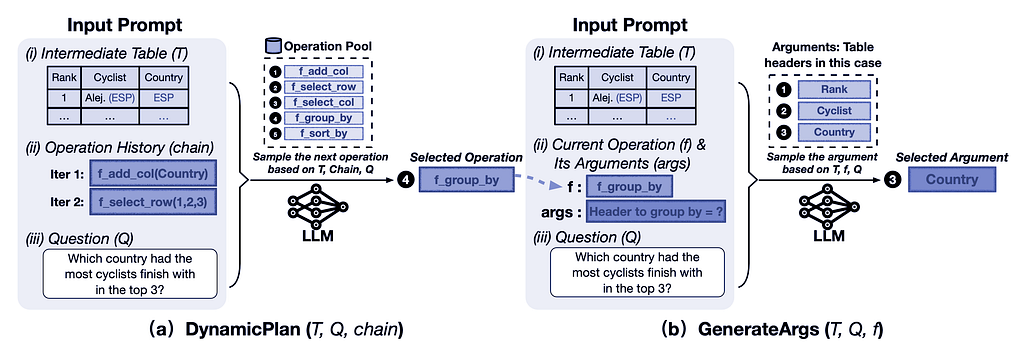
Figure 2: Illustration of DynamicPlan (sampling the next operation) and GenerateArgs (generating arguments for the operation) in the Chain-of-Table methodology.
A- Dynamic Planning
Chain-of-Table instructs the LLM to dynamically plan the next operation using in-context learning. As illustrated in Figure 2(a), the DynamicPlan involves three key components:
- Most Recent Intermediate Table (T): The current state of the table after previous operations.
- History of Previous Operations (chain): A record of the operations performed so far.
- Question (Q): The query or problem statement guiding the process.
Given these components (T, chain, Q), the LLM selects the next operation (f) from the operation pool. This dynamic planning allows the LLM to build a tabular reasoning chain step by step.
B- Argument Generation
The next step, GenerateArgs, involves generating arguments for the table operation selected by the DynamicPlan. As shown in Figure 2(b), GenerateArgs consists of three main components:
- Most Recent Intermediate Table (T): The current state of the table.
- Selected Operation with its Arguments (args): The operation chosen by DynamicPlan along with its necessary arguments.
- Question (Q): The guiding query.
Simple regular expressions are used to accommodate the varying number of arguments required by different operations. Finally, Python is used to execute the operation and generate the corresponding intermediate tables.
C- Final Query
Through the processes of dynamic planning and argument generation, a chain of operations is created, representing the tabular reasoning steps. These operations produce intermediate tables that store and present the results of each step to the LLM. Consequently, the output table from this chain of operations contains comprehensive information about the intermediate phases of tabular reasoning. This output table is then used to formulate the final query.
IV- Results
Chain-of-Table iteratively generates operations that act as proxies for tabular reasoning steps. These operations produce and present tailored intermediate tables to the LLM, conveying essential intermediate thoughts. With the support of Chain-of-Table, the LLM can reliably reach the correct answer.
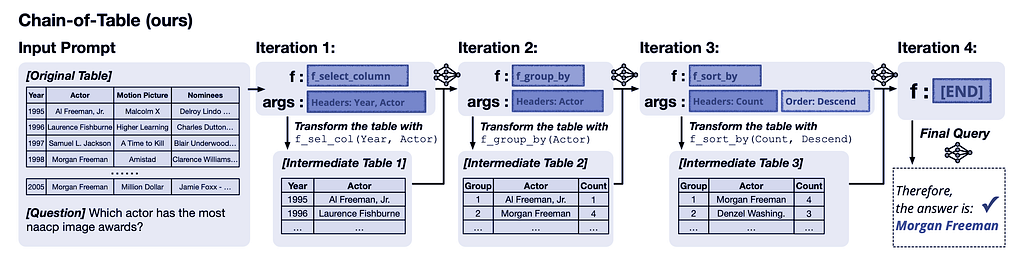
Figure 3: The tabular reasoning process in Chain-of-Table involves dynamically planning an operation chain and accurately storing intermediate results in the transformed tables. These intermediate tables serve as a tabular thought process that guides the LLM to land on the correct answer more reliably.
V- Python implementation
Let us implement a basic chain-of-table code in Python to achieve the desired results:
A- Let us import all the necessary libraries:
from langchain_groq import ChatGroq
from langchain_core.prompts import ChatPromptTemplate
from langchain_core.runnables import RunnablePassthrough, RunnableParallel
from langchain_core.output_parsers import StrOutputParser
import os
import pandas as pdDefine Groq API key and Llama model name
B- We can get a dataset about students’ results from Kaggle:
# Import and Read CSV table

# Path to the uploaded CSV file
file_path = './study_performance.csv'

# Read the CSV file into a DataFrame
T = pd.read_csv(file_path)
T.head(2)

C- We will use Groq from X and Llama3 from Meta as our LLM:
# Define Groq API key and Llama model name
groq_api_key = os.environ["GROQ_API_KEY"]
model_name = "llama3-70b-8192"
llm = ChatGroq(temperature=0.5, groq_api_key=groq_api_key, model_name=model_name)
D- Let us define the required operations, tools, and functions:
# Define operations and their parameters
operations = {
    "filter_column": {
        "column": "{column}",
        "operator": "{operator}",
        "value": "{value}"
    }
}
# Set the tools

def DynamicPlan(Q_, operations_):
    # Determine the operation based on the question
    for operation_name, params in operations_.items():
        if params["column"] in Q_ and params["operator"] in Q_:
            return operation_name

    return ['NA']

def GenerateArgs(Q_, dynamic_plan_, operations_):
    # Generate arguments based on the operation
    if dynamic_plan_ in operations:
        column_ = operations_[dynamic_plan_]["column"]
        operator_ = operations_[dynamic_plan_]["operator"]
        value_ = Q_.split(operator_)[1].strip()
        return {"column": column_, "operator": operator_, "value": float(value_)}

    return ['NA']
# Define the necessary functions

def parse_condition(Q_):
    if ">" in Q_:
        column_, value_ = Q_.split(">")
        return column_.strip(), ">", value_.strip()
    elif "<" in Q_:
        column_, value_ = Q_.split("<")
        return column_.strip(), "<", value_.strip()

    return None, None, None

def filter_rows_by_column(df, args):
    column_, operator_, value_ = args["column"], args["operator"], args["value"]
    if operator_ == ">":
        return df[df[column_] > value_]
    elif operator_ == "<":
        return df[df[column_] < value_]

    return df

def Query(T_, Q_):
    # If the question asks for the count of rows, return the count
    if "count" in Q_:
        return len(T_)
    # If the question asks for a summary of a specific column, return the summary
    elif "summary" in Q_:
        column_ = Q_.split("summary of ")[1].strip()
        if column_ in T_.columns:
            return T_[column].describe()
    else:
        return T_
# Build the chain of table

def Chain_of_Table(T_, Q_, operations_):
    chain_ = [(['B'], None)]
    while True:
        f_ = DynamicPlan(Q_, operations_)
        if f_ == ['NA']:
            break
        args = GenerateArgs(Q_, f_, operations_)
        T_ = filter_rows_by_column(T_, args)
        chain_.append((f_, args))
    A_hat = Query(T_, Q_)
    return A_hat

# reference the columns in the dataset
columns = T.columns
E- Let us build a prompt template and a chain constructor:
# Set the table and prompt template

def build_table_template(Q_, T_, column_, operator_, value_):
    template = f"""
    You are given a dataset {T_} with the following columns: {columns}.
    You need to answer the question: "{Q_}".
    Follow these steps to process the dataset {T_} and answer the question {Q_}:

    1. Determine the operations required based on the question {Q_}.
    2. Generate the arguments for the operations.
    3. Perform the operations and the arguments on the dataset {T}.
    4. Repeat the process until the final answer is obtained.

    Steps:
    1. Determine the operations : filter rows where {column_} {operator_} {value_}.
    2. Generate arguments: column="{column_}", operator="{operator_}", value={value_}.
    3. Perform the operations : filter rows based on the generated arguments.
    4. Filter the dataset {T_} by the final answer.
    5. Print the final answer

    -------------------------------------------------------------------------------
    Answer:
    """
    return template

def format_prompt(table_template_, columns_, T_, question_):
    prompt = table_template_.format(
        columns=columns_,
        data=T_,
        question=question_,
        column='{column}',
        operator='{operator}',
        value='{value}'
    )
    prompt_template_ = ChatPromptTemplate.from_template(template=prompt,
                       tools={
                              'DynamicPlan': DynamicPlan,
                              'GenerateArgs': GenerateArgs
                       })
    return prompt_template_
# Build the chain constructor

def build_chain(template):
    chain_constructor = (RunnableParallel(
        {"query": RunnablePassthrough(),
         })
             | template
             | llm
             | StrOutputParser()
        )
    return chain_constructor
F- Example 1: Generate an answer from the query
Q = "students with a score > 295?"

column, operator, value = parse_condition(Q)
table_template = build_table_template(Q, T, column, operator, value)
prompt_template = format_prompt(table_template, columns, T, Q)
chain = build_chain(prompt_template)

all_results = chain.invoke({"question": Q})
print(all_results)
LLM response:
To answer the question “students with a score > 295?”, we need to calculate the total score for each student and then filter the dataset to get the students with a score greater than 295.
Here’s the Python code to do this:
import pandas as pd
# assume ‘df’ is the given dataset
# calculate the total score for each student
df[‘total_score’] = df[‘math_score’] + df[‘reading_score’] + df[‘writing_score’]
# filter the dataset to get the students with a score > 295
students_with_score_gt_295 = df[df[‘total_score’] > 295]
# print the final answer
print(students_with_score_gt_295)This will output the filtered dataset with the students who have a total score greater than 295.
Note: The `total_score` column is calculated by adding the math, reading, and writing scores for each student. Then, the dataset is filtered to get the students with a total score greater than 295.
Let us test the LLM response:
df = T.copy()
df['total_score'] = (df["math_score"] + df["reading_score"] + df["writing_score"])

students_with_score_gt_295 = df[df['total_score'] > 295]
print(students_with_score_gt_295)

G- Example 2: Generate an answer from the query
Q = "race_ethnicity of students with a total score > 250 and test_preparation_course = completed? and gender = male?"

column, operator, value = parse_condition(Q)
table_template = build_table_template(Q, T, column, operator, value)
prompt_template = format_prompt(table_template, columns, T, Q)
chain = build_chain(prompt_template)

all_results = chain.invoke({"question": Q})
print(all_results)
LLM response:
Let’s go through the steps to answer the question.
**Step 1: Determine the operations**
We need to filter the dataset based on the conditions:
* `test_preparation_course` equals “completed”
* `gender` equals “male”
* Total score (i.e., `math_score + reading_score + writing_score`) is greater than 250
**Step 2: Generate arguments**
We need to generate the arguments for the operations:
* `test_preparation_course` equals “completed”
* `gender` equals “male”
* Total score is greater than 250
**Step 3: Perform the operations**
Let’s perform the operations on the dataset:import pandas as pd
# assume the dataset is in a Pandas DataFrame called df
# calculate the total score
df[‘total_score’] = df[‘math_score’] + df[‘reading_score’] + df[‘writing_score’]
# filter the dataset based on the conditions
filtered_df = df[(df[‘test_preparation_course’] == ‘completed’) &
(df[‘gender’] == ‘male’) &
(df[‘total_score’] > 250)]
# extract the race_ethnicity column from the filtered dataset
race_ethnicity = filtered_df[‘race_ethnicity’]**Step 4: Repeat the process until the final answer is obtained**
We have already obtained the final answer, which is the `race_ethnicity` column of the filtered dataset.
**Final answer:**
The race_ethnicity of students with a total score > 250 and test_preparation_course = completed and gender = male is:print(race_ethnicity)
This will output the race_ethnicity values of the students who meet the conditions.
Let us test the LLM response:
filtered_df = df[(df['test_preparation_course'] == 'completed') &
                  (df['gender'] == 'male') &
                  (df['total_score'] > 250)]

race_ethnicity = filtered_df['race_ethnicity']
print(race_ethnicity)

VI- Conclusion
The Chain-of-Table framework enhances the capabilities of large language models in handling table-based reasoning tasks. By iteratively generating operations that transform the tables step-by-step, Chain-of-Table creates a structured reasoning process that guides the LLM towards accurate and reliable predictions.
The method dynamically plans operations and generates necessary arguments, forming a coherent chain of intermediate tables. These tables serve as visual representations of the reasoning process, enabling the LLM to better understand the underlying semantics of the data. The iterative approach ensures that each step contributes logically to solving the problem, leading to more precise outcomes.
The code implementation of Chain-of-Table is tested and works as expected, achieving good results. It is important to note that repeating the same question many times using this LLM and this technique, produces the same answers, which means that the system achieves consistency using this method. The framework’s ability to decompose complex tabular reasoning into manageable steps, coupled with the visualization of intermediate results, makes it a good tool for table understanding tasks.
For more information and to explore how my data science consulting services can benefit your company, please visit my website at samuelchazy.com
Explore my LLM website, offering a unique opportunity to interact with and analyze any document: https://gptdocanalyzer.com/
In Plain English 🚀
Thank you for being a part of the In Plain English community! Before you go:
- Be sure to clap and follow the writer ️👏️️
- Follow us: X | LinkedIn | YouTube | Discord | Newsletter
- Visit our other platforms: CoFeed | Differ
- More content at PlainEnglish.io
Enhanced LLM Tabular Reasoning with Chain-of-Table for CSV Files was originally published in Artificial Intelligence in Plain English on Medium, where people are continuing the conversation by highlighting and responding to this story.
* This article was originally published here
